Configuring Tunables
Describes how to add or edit tunables on FreeCORE.
Warning
Be careful when adding or editing the default tunables. Changing the default tunables can make the system unusable.
FreeCORE allows you to add system tunables from the web interface. You can manually define tunables, or FreeCORE can run an autotuning script to attempt to optimize the system. Tunables are used to manage FreeCORE sysctls, loaders, and rc.conf options.
- loader specifies parameters to pass to the kernel or load additional modules at boot time.
- rc.conf enables system services and daemons and only takes effect after a reboot.
- sysctl configures kernel parameters while the system is running and generally takes effect immediately.
Important
Adding a sysctl, loader, or rc.conf option is an advanced feature.
A sysctl immediately affects the kernel running the FreeCORE system, and a loader can adversely affect the FreeCORE boot process.
Do not create a tunable on a production system before testing the ramifications of that change.
Configure Tunables
To configure a tunable, go to System > Tunables and click ADD.
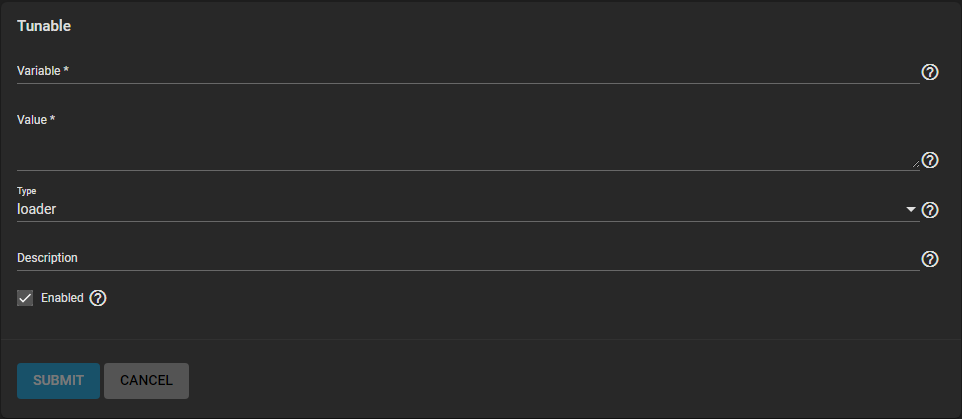
Select the Type of tunable to add or modify. Enter the name of the loader, sysctl, or rc.conf variable to configure.
Next, enter the value to use for the loader, sysctl, or rc.conf.
If you wish to create the system tunable but not immediately enable it, unset the Enabled checkbox. Configured tunables remain in effect until deleted or Enabled is unset.
We recommend restarting the system after making sysctl changes. Some sysctls only take effect at system startup, and restarting the system guarantees that the setting values correspond with what the running system uses.
Autotuning
FreeCORE provides an autotune script that optimizes the system depending on the installed hardware.
For example, if a pool exists on a system with limited RAM, the autotune script automatically adjusts some ZFS sysctl values to minimize memory starvation issues. Autotuning can introduce system performance issues. You must only use it as a temporary measure until you address the underlying hardware issue. Autotune always slows a RAM-starved system as it caps the ARC.
Warning
We do not recommend using the autotuning script if you maintain specific manual tunings; the script can override them.
Enabling autotune runs the autotuner script at boot. To run the script immediately, reboot the system.
Any tuned settings appear in System > Tunables.
Loading DRM Graphics Drivers at Boot
FreeCORE includes drm-66-kmod but does not load a graphics driver automatically. First test the driver for your hardware from a root shell; for example, kldload amdgpu. This loads it for the current boot only.
To load that driver on future boots, add this tunable in System > Tunables:
| Variable | Value | Type |
|---|---|---|
kld_list |
hwpmc t4_tom amdgpu |
RC |
Keep the modules already present in kld_list and append the driver required by your hardware, such as amdgpu, i915kms, or radeonkms. FreeCORE reads this RC value after regenerating its system configuration and loads any module that is still missing. Do not use an amdgpu_load LOADER tunable: the stock FreeBSD loader blacklist skips that directive, and there is no matching amdgpu_force tunable.
Reboot, then use kldstat to verify that the driver loaded. FreeCORE 15.0 does not include GPU firmware packages, so attaching a physical GPU can also require firmware specific to that device before /dev/dri nodes appear.