Changing the Default Shell
Describes how to change the default shell on FreeCORE.
The default shell for an account is the environment that user accesses in a local or SSH session.
The default shell for a new installation is zsh.
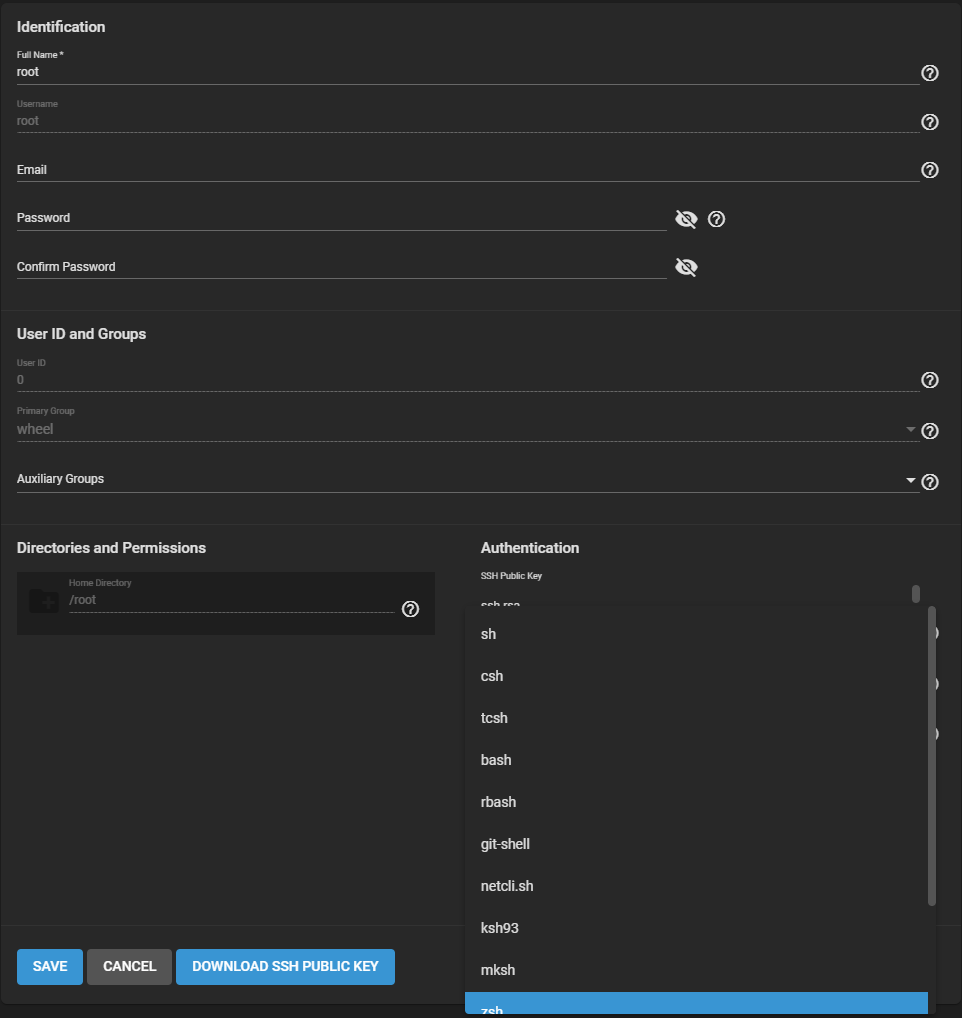
You can change the default shell in Accounts > Users.
- Click for the root user and click Edit.
-
Choose the desired shell from the Shell dropdown list and click SAVE. Shell options are:
| Shell | Description |
|---|---|
| csh | C shell for UNIX system interactions. |
| sh | Bourne shell |
| tcsh | Enhanced C shell that includes editing and name completion. |
| bash | Bourne Again shell for the GNU operating system. |
| ksh93 | Korn shell that incorporates features from both csh and sh. |
| mksh | MirBSD Korn Shell |
| rbash | Restricted bash |
| rzsh | Restricted zsh |
| scponly | scponly restricts the user's SSH usage to only the scp and sftp commands. |
| zsh | Z shell |
| git-shell | restricted git shell |
| nologin | Use when creating a system account or to create a user account that can authenticate with shares but which cannot log in to the FreeCORE system using ssh. |