Running S.M.A.R.T. Tests
Provides information on how to run Self-Monitoring, Analysis and Reporting Technology (S.M.A.R.T.) tests on your FreeCORE.
S.M.A.R.T. (Self-Monitoring, Analysis and Reporting Technology) is an industry standard for disk monitoring and testing. Disks are monitored for problems using several different kinds of self-tests. FreeCORE can adjust when and how alerts for S.M.A.R.T. are issued. When S.M.A.R.T. monitoring reports an issue, we recommend you replace that disk. Most modern ATA, IDE, and SCSI-3 hard drives support S.M.A.R.T. Refer to your respective drive documentation for confirmation.
S.M.A.R.T. tests run on a disk. Running tests can reduce drive performance, so we recommend scheduling tests when the system is in a low-usage state. Avoid scheduling disk-intensive tests at the same time! For example, do not schedule S.M.A.R.T. tests on the same day as a disk scrub or resilver.
Manual S.M.A.R.T. Tests
To quickly test a disk for errors, go to Storage > Disks and select the disks to be tested. After selecting the desired disks, click MANUAL TEST.
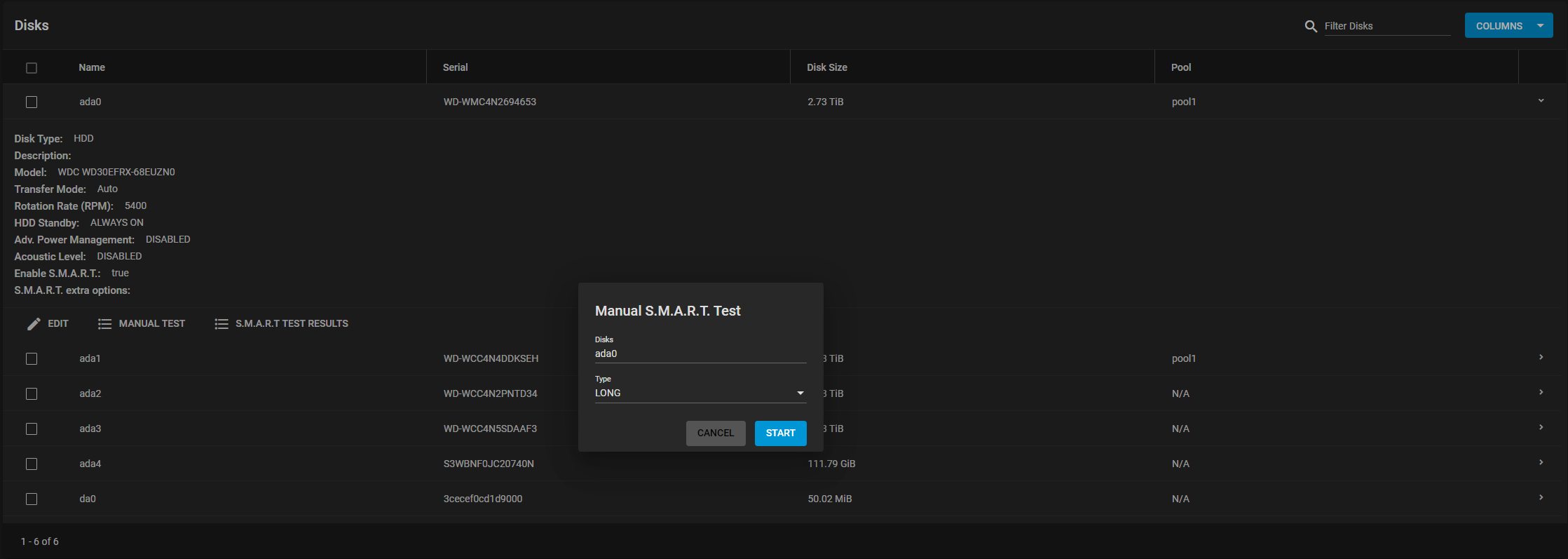
Next, select the test Type. Each test type can differ based on the drive connection, ATA or SCSI:
ATA Connection
- Long - runs S.M.A.R.T. Extended Self-Test. This scans the entire disk surface and can take many hours on large-volume disks.
- Short - runs S.M.A.R.T. Short Self-Test (usually under ten minutes). These are basic disk tests that vary by manufacturer.
- Conveyance - runs S.M.A.R.T. Conveyance Self-Test. This self-test routine identifies damage incurred during transporting of the device. This self-test routine requires only minutes to complete.
- Offline - runs S.M.A.R.T. Immediate Offline Test. Updates the S.M.A.R.T. attribute values. If the test finds errors, the errors only appear in the SMART error log.
SCSI Connection
- Long - runs the Background long self-test.
- Short - runs the Background short self-test.
- Offline - runs the default self-test in foreground. No entry is placed in the self-test log.
For more information, refer to smartctl(8).
Click START to begin the test. Depending on the test type you choose, the test can take some time to complete. FreeCORE generates alerts when tests discover issues.
Automatic S.M.A.R.T. Tests
Go to Tasks > S.M.A.R.T. Tests and click ADD.
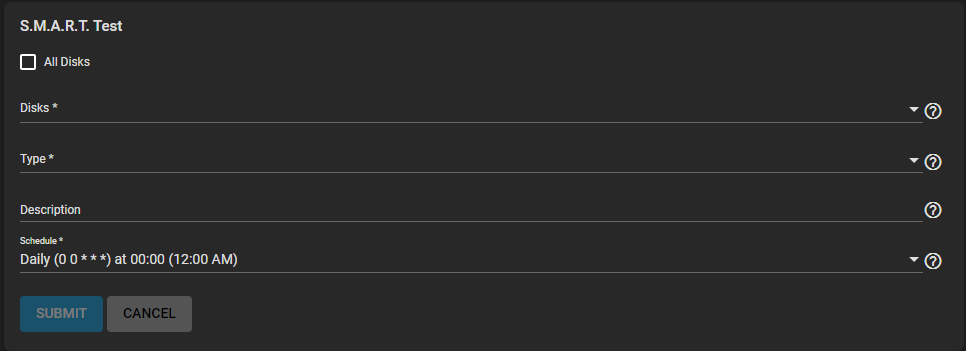
Select the Disks to test, Type of test to run, and Schedule for the task.
Important
S.M.A.R.T. tests can offline disks! Avoid scheduling S.M.A.R.T. tests simultaneously with scrub or resilver operations.
Saved schedules appear in the Tasks > S.M.A.R.T. Tests list.
Service Options
You must enable S.M.A.R.T. service to run automatic S.M.A.R.T. tests.