Bastille Jails
Configure the Bastille service in the web interface, then create and manage jails with the bastille command; the interface shows each jail's state and resource use.
FreeCORE 15.1 includes Bastille alongside the existing iocage jail manager. The two engines keep separate releases, configuration and lifecycle, and existing iocage jails are not converted. See Plugins, Jails and Applications when choosing where a workload should run.
From 15.1-RC3 the web interface is a console over Bastille rather than a
second jail manager. It configures the Bastille service and shows every jail
with its state and resource use; the jails themselves are created and managed
on the console with the bastille command. Open Jails, then the cogwheel,
then Bastille Jails. The cogwheel on that page leads to Bastille
Settings and back to iocage Jails.
Configure the Service
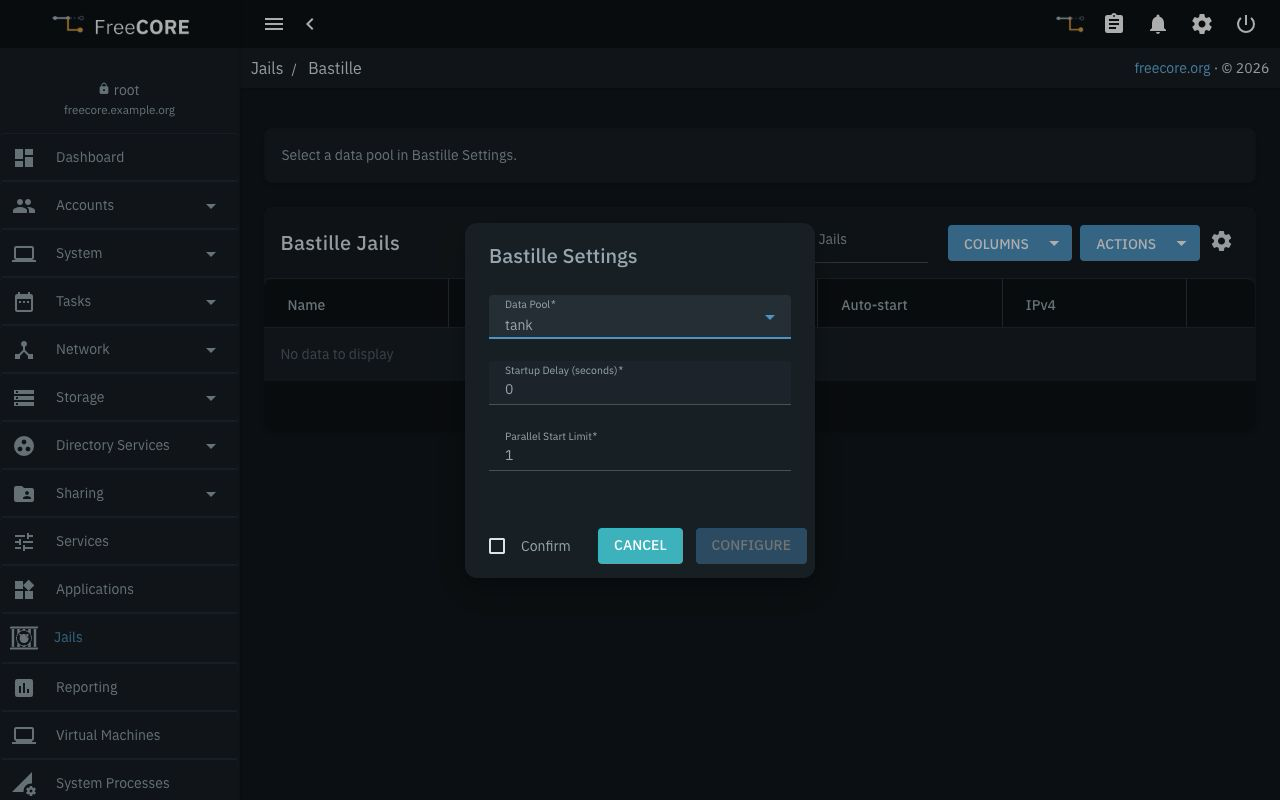
- Open Bastille Settings from the cogwheel and select a healthy, online,
unlocked Data Pool. Bastille keeps its releases, jails, templates and
logs below
/mnt/<pool>/bastille. - Review Startup Delay (seconds) and Parallel Start Limit, which control automatic startup, then click Save.
- To start jails after a host boot, enable Start Automatically for Bastille on Services, and mark each jail for startup as shown below. The configured pool must be available when startup runs.
Once a pool is configured, bastille finds it on its own. No environment
variable and no per-shell setup is needed; open a console as root and use
the commands below. Changing the selected pool later is not a jail migration
procedure.
Download a Release
A release is the FreeBSD base a jail runs on. Its version need not match the
FreeCORE version. Download it as packages (-p), so that it can be updated
later:
bastille bootstrap -p 15.1-RELEASE
bastille list release
FreeCORE does not ship freebsd-update, so a release fetched as a single
archive (bastille bootstrap 15.1-RELEASE, without -p) cannot receive
security patches on this system. A packaged release is updated through pkg,
and this works for FreeBSD 15.0 and later.
Keep a Release Updated
bastille update 15.1-RELEASE
Every jail built on the release shares its userland; restart those jails
afterwards. bastille update <jail> applies only to thick jails.
Create a Jail
A VNET jail has its own network stack and can use DHCP. Bastille attaches it to a bridge on the interface you name, creating the bridge when needed:
bastille create -V web 15.1-RELEASE DHCP vtnet0
For a static address, give the address and prefix instead of DHCP:
bastille create -V web 15.1-RELEASE 192.168.1.50/24 vtnet0
Without -V the jail shares the host's network stack and needs a static
address, which is added as an alias on the interface. DHCP requires a VNET
jail, as it does with iocage. Names use 1–11 letters or digits; Bastille's
own command names are reserved.
A host interface belongs to one bridge. -V places the interface you name in
a bridge of its own; iocage's VNET jails use bridge0 on the interface they
are given. Do not point both at the same interface: whichever starts second
cannot attach. On a host that also runs iocage VNET jails, give Bastille a
different interface.
Start, Stop and Inspect
bastille start web
bastille stop web
bastille restart web
bastille list all
bastille console web
To include a jail in automatic startup, set its boot flag; the service's Start Automatically setting must also be enabled:
bastille config web set boot on
The web interface shows the same state. Use Refresh on Bastille Jails after changing a jail on the console.
Apply a Template
A Bastille template is a directory with a Bastillefile that installs and
configures an application inside a jail. Templates come from git repositories
you choose, fetched with the same bootstrap command as a release:
bastille bootstrap https://github.com/tschettervictor/bsd-apps
bastille template web bsd-apps/jellyfin
A template runs commands inside the jail as root, so choose repositories
the way you choose packages, and read a template before applying it to a
customized jail. A failed template can leave partial changes; inspect the
jail before retrying. FreeCORE reviews none of the templates a repository
provides.
What Not to Do
Do not run bastille setup. It configures a plain FreeBSD host: it writes a
firewall ruleset that FreeCORE's Bastille service refuses to start with, and
its other changes land in files FreeCORE regenerates at every boot. The web
interface configures the storage; the image provides the rest.
bastille limits needs the loader tunable kern.racct.enable=1. Add it in
System → Tunables (type loader) and reboot, as for iocage resource
limits.
FreeCORE does not configure PF for Bastille, and Bastille refuses bastille rdr for VNET jails. A VNET jail has its own address on your network, so
services in it are reached directly; templates that declare RDR lines do not
apply here.
Reclaim Space
bastille destroy web
bastille destroy 15.1-RELEASE
Destroying a release is refused while a jail still uses it. Datasets mounted into a jail from elsewhere on the pool are not part of the jail and remain.
What the Web Interface Shows
Bastille Jails lists every jail by name: State, IPv4 (the leased
address of a running DHCP jail, shown with its interface as vnet0|…, or
DHCP while it is stopped),
Release, Auto-start, and, for running jails, live CPU, Memory
and Processes, plus the jail's Disk usage. Console Log shows a
jail's console output. Releases lists each downloaded release with its
size and the jails using it. The Guests card on the dashboard shows
running Bastille jails in their own section; a row opens Bastille Jails.
See Bastille Screens for every field.