SSH Connections
Describes the SSH screen fields on FreeCORE.
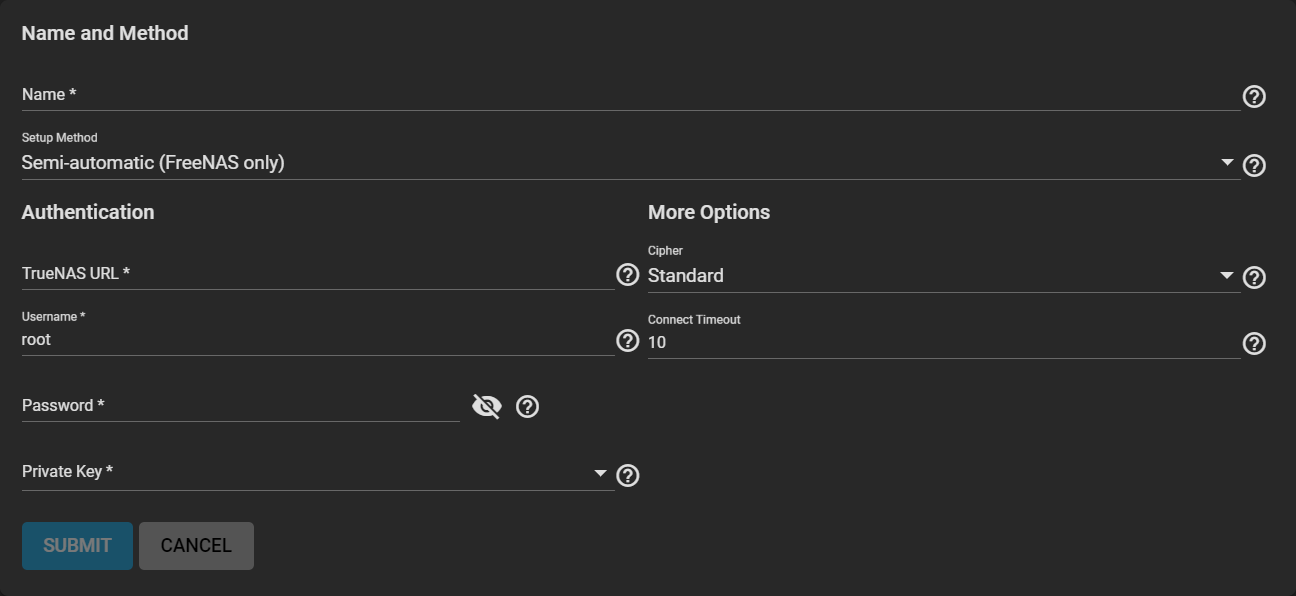
Name and Method
| Name | Description |
|---|---|
| Name | Name of this SSH connection. SSH connection names must be unique. |
| Setup Method | Manual requires configuring authentication on the remote system. This can include copying SSH keys and modifying the root user account on that system. Semi-automatic only works when configuring an SSH connection with a remote FreeCORE system. This method uses the URL and login credentials of the remote system to connect and exchange SSH keys. |
Authentication
| Name | Description |
|---|---|
| FreeCORE URL | Hostname or IP address of the remote system. A valid URL scheme is required. Example: https://10.231.3.76 |
| Username | Username for logging in to the remote system. |
| Password | User account password for logging into the remote system. |
| Private Key | Choose a saved SSH Keypair or select Generate New to create a new keypair and use it for this connection. |
More Options
| Name | Description |
|---|---|
| Cipher | Standard is most secure, but has the greatest impact on connection speed. Fast is less secure than Standard but can give reasonable transfer rates for devices with limited cryptographic speed. Disabled removes all security in favor of maximizing connection speed. Disabling the security should only be used within a secure, trusted network. |
| Connect Timeout | Time (in seconds) before the system stops attempting to establish a connection with the remote system. |