Alert Services
Describes the fields on the Alert Services screen on FreeCORE.
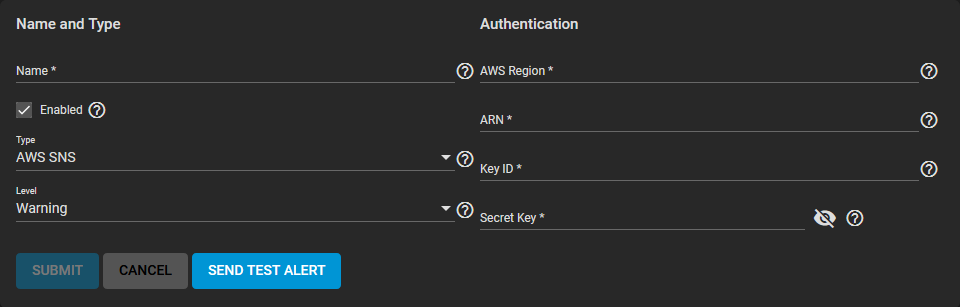
Name and Type
| Name | Description |
|---|---|
| Name | Name of the new alert service. |
| Enabled | Unset to disable this service without deleting it. |
| Type | Choose an alert service to display options for that service. |
| Level | Select the level of severity. |
Authentication
AWS
| Name | Description |
|---|---|
| AWS Region | Enter the AWS account region. |
| ARN | Topic Amazon Resource Name (ARN) for publishing. Example: arn:aws:sns:us-west-2:111122223333:MyTopic. |
| Key ID | Access Key ID for the linked AWS account. |
| Secret Key | Secret Access Key for the linked AWS account. |
| Name | Description |
|---|---|
| Email Address | Enter a valid email address to receive alerts from this system. |
InfluxDB
| Name | Description |
|---|---|
| Host | Enter the InfluxDB hostname. |
| Username | Username for this service. |
| Password | Enter password. |
| Database | Name of the InfluxDB database. |
| Series | InfluxDB time series name for collected points. |
Mattermost
| Name | Description |
|---|---|
| Webhook URL | Enter or paste the incoming webhook URL associated with this service. |
| Username | Mattermost username. |
| Channel | Name of the channel to receive notifications. This overrides the default channel in the incoming webhook settings. |
| Icon Url | Icon file to use as the profile picture for new messages. Example: https://mattermost.org/wp-content/uploads/2016/04/icon.png. Requires configuring Mattermost to override profile picture icons. |
OpsGenie
| Name | Description |
|---|---|
| API Key | Enter or paste the API key. Find the API key by signing into the OpsGenie web interface and going to Integrations/Configured Integrations. Click the desired integration, Settings, and read the API Key field. |
| API URL | Leave empty for default OpsGenie API. |
PagerDuty
| Name | Description |
|---|---|
| Service Key | Enter or paste the "integration/service" key for this system to access the PagerDuty API. |
| Client Name | PagerDuty client name. |
Slack
| Name | Description |
|---|---|
| Webhook URL | Paste the incoming webhook URL associated with this service. |
SNMP Trap
| Name | Description |
|---|---|
| Hostname | Hostname or IP address of the system to receive SNMP trap notifications. |
| Port | UDP port number on the system receiving SNMP trap notifications. The default is 162. |
| SNMPv3 Security Model | Enable the SNMPv3 security model. |
| SNMP Community | Network community string. The community string acts like a user ID or password. A user with the correct community string has access to network information. The default is public. For more information, see this helpful SNMP Community Strings tutorial. |
VictorOps
| Name | Description |
|---|---|
| API Key | Enter or paste the VictorOps API key. |
| Routing Key | Enter or paste the VictorOps routing key. |