Shadow Copies
Describes how to configure shadow copies on FreeCORE.
Shadow Copies, also known as the Volume Shadow Copy Service (VSS) or Previous Versions, is a Microsoft service for creating volume snapshots. Shadow copies can be used to restore previous versions of files from within Windows Explorer.
By default, all ZFS snapshots for a dataset underlying an SMB share path are presented to SMB clients through the volume shadow copy service or are accessible directly with SMB when the hidden ZFS snapshot directory is located within the path of the SMB share.
There are a few caveats about shadow copies to be aware of before activating the feature in FreeCORE:
-
When the Windows system is not fully patched to the latest service pack, Shadow Copies might not work. If no previous versions of files to restore are visible, use Windows Update to ensure the system is fully up-to-date.
-
Shadow copy support only works for ZFS pools or datasets.
-
Appropriate permissions must be configured on the pool or dataset shared by SMB.
-
Users cannot use an SMB client to delete shadow copies. Instead, the administrator uses the FreeCORE web interface to remove snapshots. Shadow copies can be disabled for an SMB share by clearing the checkmark from Enable shadow copies for the SMB share. This does not prevent access to the hidden
.zfs/snapshotdirectory for a ZFS dataset when the directory is located within the path for an SMB share.
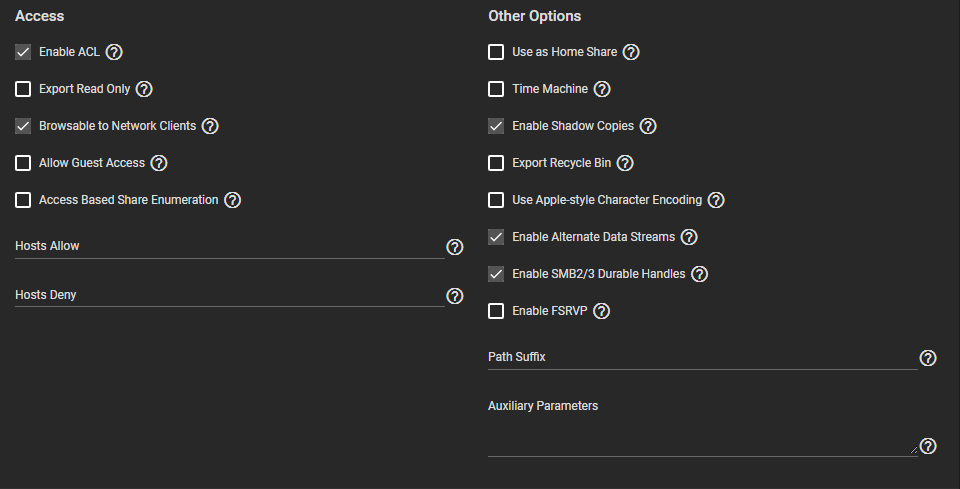
To enable Shadow Copies, go to Sharing > Windows Shares (SMB) and Edit an existing share. Open the Advanced Options, find the Other Options and select Enable Shadow Copies.