WebDAV Services Screen
Describes the WebDAV screen in FreeCORE.
The WebDAV protocol contains extensions to HTTP. These extensions expand the capabilities of a webserver. It can act as a collaborative authoring and management tool for web content. Use the Services WebDAV screen to enable WebDAV services on your FreeCORE.
Click ADD to open the WebDAV settings screen.
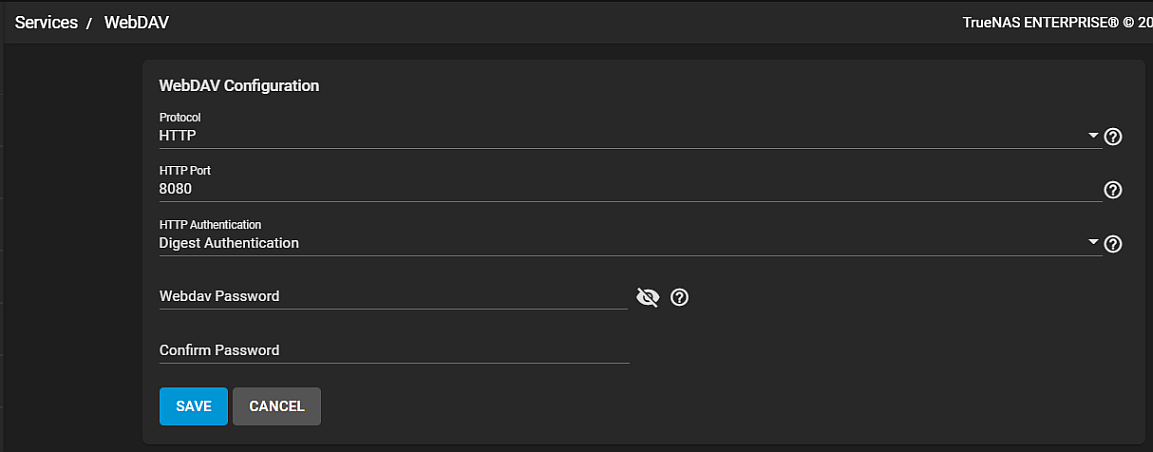
General Options
| Name | Description |
|---|---|
| Protocol | Select the protocol from the dropdown list. HTTP keeps the connection unencrypted. HTTPS encrypts the connection. HTTP+HTTPS allows both types of connections. |
| HTTP Port | Specify a port for unencrypted connections. The default port 8080 is recommended. Do not reuse a port. |
| HTTP Authentication | Select the HTTP authentication type from the dropdown list. Basic Authentication is unencrypted. Digest Authentication is encrypted. Select No Authentication when you don't want to use authentication. |
| Webdav Password | Change the default of davtest as davtest is a known value. |