rar2fs Screen
Describes the rar2fs service screen in FreeCORE.
rar2fs presents RAR archives as a read-only filesystem. It mounts one source directory through FUSE and shows each archive in it as a directory whose contents can be read in place, with no extraction step and no second copy of the data. Files that are not archives appear unchanged, so the mounted view can be used in place of the source directory.
Go to Services and click the icon in the rar2fs row to open the settings screen. The service starts only after a source directory is configured, and only if that directory exists.
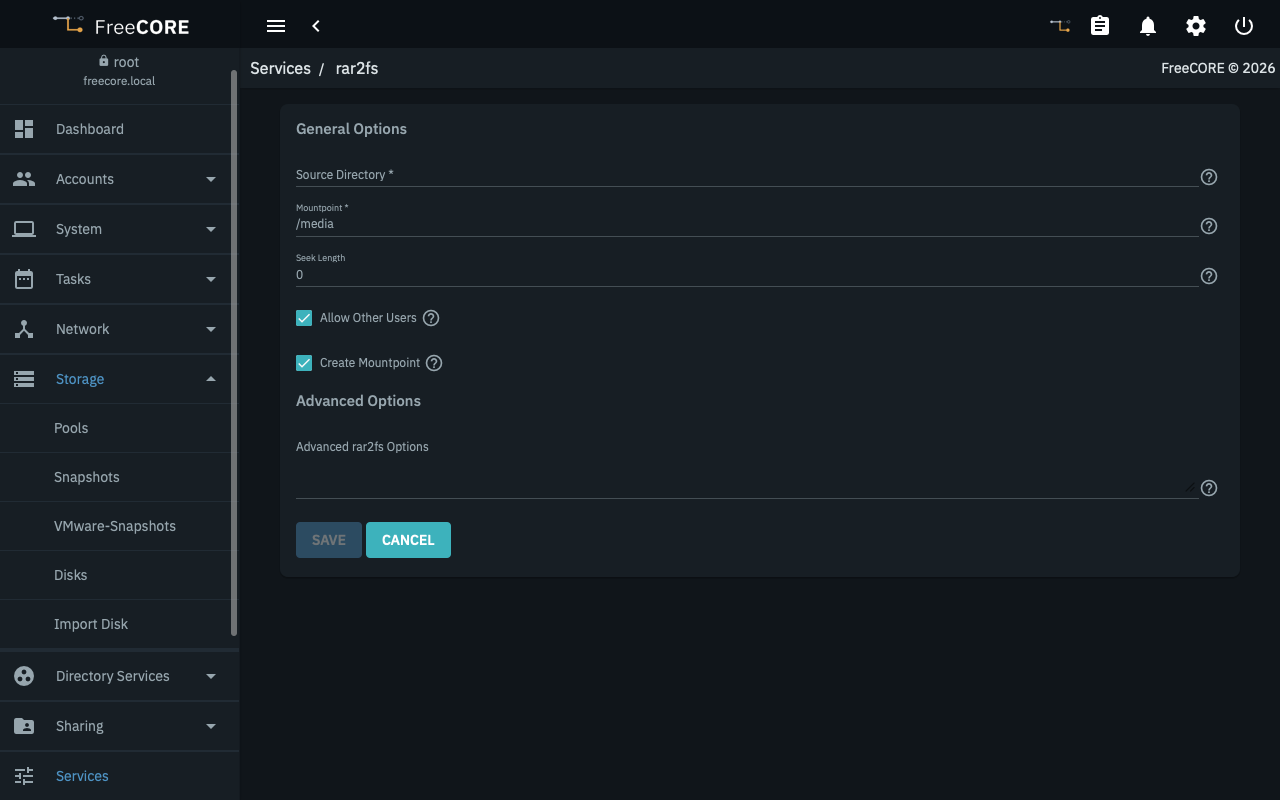
General Options
| Name | Description |
|---|---|
| Source Directory | Absolute path of the directory holding the RAR archives to expose. Required. |
| Mountpoint | Absolute path where rar2fs presents the mounted view. The default is /media. It cannot be the root directory, cannot be the same path as Source Directory, and the two paths cannot contain one another. |
| Seek Length | How many volumes of a multi-volume RAR set to scan for file headers. The default 0 scans every volume. 1 scans only the first volume, which is quicker but hides any file whose header is in a later volume. |
| Allow Other Users | Passes -o allow_other to rar2fs so users and services other than rar2fs can read the mounted view. |
| Create Mountpoint | Creates the mountpoint directory when the service starts. When this is not set, the mountpoint must already exist or the service does not start. |
Advanced Options
| Name | Description |
|---|---|
| Advanced rar2fs Options | Extra arguments to pass to rar2fs. Do not repeat the source, the mountpoint, --seek-length, or allow_other here — the service supplies those from the fields above, and saving is rejected if they are given twice. |
Saving a change restarts the service, which unmounts and remounts the view. Anything reading from the mountpoint at that moment is interrupted, so change settings when the mount is idle.